


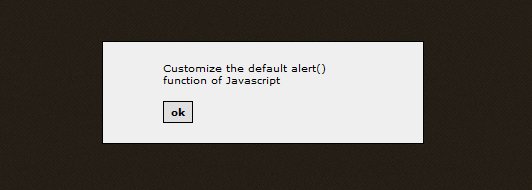
Customize the default alert() function of Javascript
Web designers, developers and web users know them. We all have run across one of these; the Javascript alert message. Most of the time, I don’t even read them and click them away. But the more important thing is that they just look ugly, no matter which browser you use.
So why not remake the whole Javascript alert function? This article will give you the basics of my customization of the alert message.
Download
GdAlert zip-archive
Example
Open the GdAlert example
While working on a new project which will launch in a few months (I hope!) I used a lot of alert messages in Javascript, just because it’s easy and quick to use. The problem still is that it looks ugly. So, I decided to overwrite the alert function and create my own version of it. Sweet, not?
What did I do?
First of all, I needed a way to overwrite the alert function because I didn’t want to go and refactor all of my code to call another function, you programmers understand me ;).
Next is how the message should displayed on the screen.
The first problem is surprisingly easy, you can just overwrite a function by declaring it again.
To display the message, I created a quick container which will be centered. There will also be a container beneath with message box to darken and disable the rest of the page.
Okay, so now for the things you need to do.
Go to http://script.aculo.us/downloads and download the latest version of scriptaculous.
Also download GdAlert: http://www.gayadesign.com/scripts/gdalert/gdalert.zip
Upload the contents to your server.
Now place the following code in the head section of your page.
<script src="js/prototype.js" type="text/javascript"></script>
<script src="js/scriptaculous.js" type="text/javascript"></script>
<script src="js/gdAlert.js" type="text/javascript"></script>
So now that you’ve got the Javascript files ready, we now need to do one last thing.
Include the following code right after the tag:
<div id='alert_message' style='display: none'>
	<span>
	</span>
	<input type='button' value='ok' class='button' onclick='gdAlert.close()' />
	<br style='clear: both' />
</div>
That was it. Now all your alert function calls will be nicer and personalized.
Take a look in the CSS to configure the looks of the message box, I’d really like to see what variations you make of this script.
Good luck!
Articles like this one
Articles like this one


27 Comments
-
Yo gaya,
Nice work. I don’t know scriptaculous that good, but I expect that i should be able to alter the DOM. So why not inject the needed HTML into the DOM when the alert is shown?
Gr, Jape
-

Hey Jape,
Thanks for the comment and you are totally right, and that’s what I do with the overlay container.
I wanted to keep the HTML of the message box easy adjustable for must developers. You can always insert the DOM automatically though =). But this I thought this would be easier for most users.
-

Nice work!, but is it possible to add focus to the ‘ok’ button? Most times I skip alerts without reading them by hitting enter, but try doing that in your example and things go horribly wrong :O
-
@Bounzze:
Good thinking! I hadn’t even noticed it.
I changed a bit of the code so it will focus on the “ok” button.
I’ve also changed a strange thing; after the fade out effect the overlay will be removed.
-

Sweet!
-
ohmaiGod!! i looking for this script..
thanks so much for the author 🙂
-
it didnt work on mine.. 🙁
when i click the button to show alert msg, it just appear black page ..
any suggestion to fix it?
-
Hey Neki Chan,
Which browser do you use? Maybe I can fix it =)
-
Nice… Nice.. Will come to your site when I lost in PHP programming… 😀
-
@Jayce:
You are free to ask questions whenever you’d like.
-
Can’t seem to get it to work on IE…any manual on this?
-
@keeman
I’ll most likely create a jQuery version of this script so it will be more cross browser then.
Thanks for trying it out =)
-
This is a great thing which i was trying to findout for long time but this is not working with my IE 6.0 even your given example also showing “error on the page” in status bar and nothing it is doing. If u can solve that problem i will be very thankful to you.
-
Hey Anil,
When I made this script. I tested it in IE6, but this version could be not working properly. Will look at it 🙂 thanks for commenting!
-

mmm… i forget 🙁
between IE8 or mozilla..i haven’t tried it again 🙂
-
hi,
tested in IE7 > error > focus issue.
it show but alignment run to almost out of screen at top part if i comment off focus() at top part of gdAlert.js.
firefox & chrome works without an error.
-
Hello Dear Sir,
I’ve read your amazing article how to customize the alert of js
at the following link :
http://www.gayadesign.com/diy/customize-the-default-alert-function-of-javascript/However i have a question , how it could be in case of forms , for example if we have
function NewBanner() {
if(document.f1.BannerFile.value==””)
{
alert(‘blah blah blah’);
document.f1.BannerFile.focus();
return false;
}
}and we have form html code as following :-
i mean how to customiz the alert if it was depends on an action , when i do don’t choose banner and click on submit, it gives me alert blah blah …. how then customiz it in such case.
thanks in advance
-
Nice script but it not works on IE. So, it is not useful. 🙁
-
Hi,
ave tried your script in IE7, it still has Focus issue any workaround for this ? will be greatful to you if suggest so
Thanks
John
-
“EXCUSE ME BUT IE6 IS DEAD ”
I’m afraid not! We’ve got over 520 machines here with XP/SP2 and IE6, and yes this is mid 2011, and they work like a charm thank you! 😉
Now, will you kindly refrain from playing the Internet police telling people what they should or shouldn’t be running?
Thanks in advance!
-
hi! this is a very useful script! thanks!
i was wondering if you can use the script when the alert is being evoke by php like this:
<?php
if (isset($_POST[‘submit’])){
echo "\n”;
echo “alert(‘You’re message here.’)”;
echo “”;
echo “document.location.href=’index.php’”;
}
?>it’s not working for me. it seems that it will ignore the alert box and it will go directly to index.php.
any help is greatly appreciated.
thanks!
-
hey its not working on my when i click on link screen goes completely dark… please help?
-
nice post but i think the functionality of overlay disable the selection of conent of the background, but here its selectable even if alert is displayed.
-
Hey Gaya,
I’ve been trying for ages to customize this alert box. Your script had my convinced, but after installing it all i get is a black screen on Chrome.
Any ideas on how to get this working?
-
same problem when i used it ..it show black screen…guide me..
-
I’ve spent weeks getting to grips with javascript to validate my contact form. It finally worked today and so I looked for a way to customise my alert message and I found this page. The example looks good and I should have no problem in adapting the css, but I have done everything you say to do, ie put the code in the right places, and now the form skips my validation javascript altogether!!
-
Can someone explain me step by step how to put this working with wordpress. I’m a newbie so i don’t understaand a lot of this…
I would like to put it in the front page…


Recent comments